Camflite Mapper › Soft wash drone planner
Soft washSoft wash drone flight planning for buildings, walls and tanks
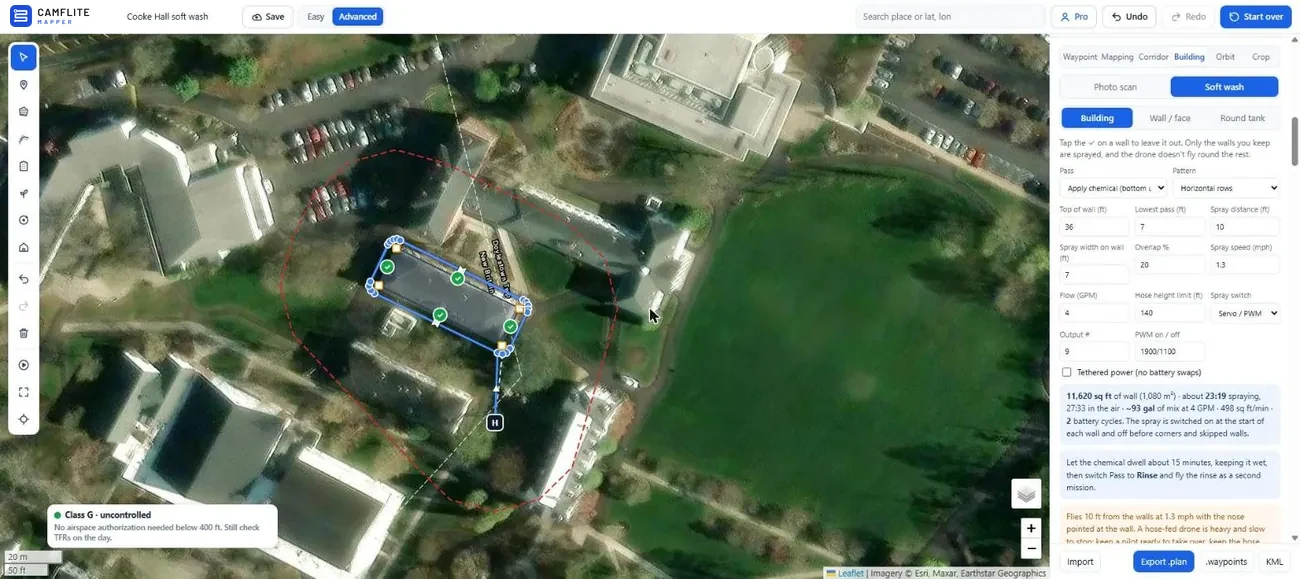
Draw the wall with two taps (or pick the whole building), and Camflite Mapper builds the spray passes for a hose-fed cleaning drone: the nose on the wall, the spray switched on and off with every pass, and the gallons and time worked out before you unload the trailer.
Built for how soft washing is actually done
Any shape of job
Draw a single wall face with two taps, pick a building from its map outline and leave out walls you don't want sprayed, or tap the middle of a water tower or tank and enter its radius. Only the walls you keep are sprayed, and the drone never flies round the rest of the building.
The right order every time
Chemical goes on from the bottom up so it doesn't streak; the rinse comes down from the top. Choose horizontal rows or vertical stripes, set the spray width on the wall and the overlap.
The nose stays on the wall
Every spray point faces straight at the wall, including round corners, so the nozzle is always aimed where it should be. Two separate faces? The drone climbs over the roof to get between them with the spray off.
Numbers before you leave
Wall area in square feet, spraying time, time in the air, gallons of mix at your pump's flow rate and how many battery cycles it takes, or none if you fly tethered.
Spray control that matches your rig
Servo/PWM or relay
The spray is switched by a servo or PWM output (with your on and off pulse widths) or a relay, at the start of each wall and off before corners and skipped walls.
Hose height limit
Set the highest your hose reaches and the planner warns you when a wall goes above it.
Distance and speed
Spray distance, spray speed and the lowest pass are yours to set; the planner keeps the drone at that distance from every wall it sprays.
How it works
From map to mission file in four steps
- Tap the buildingIts outline comes from OpenStreetMap, or tap the corners yourself. Use Wall / face or Round tank for other jobs.
- Set the passChemical or rinse, rows or stripes, wall height, spray distance and flow.
- Check itAirspace, weather, wind and batteries for the day you'll wash.
- ExportA mission file for your ground station or DJI Pilot 2.
Questions
Soft wash drone planner: common questions
Can I wash just one side of a building?
Yes, and it's where soft wash starts: tap one end of the wall, then the other, and the drone washes only that face. It starts on the side facing your takeoff point, and one tap flips it if it's on the wrong side. You can also pick a whole building and leave out the walls you don't want sprayed.
Does it handle water towers and round tanks?
Yes. Choose Round tank, tap the middle of the tank and enter its radius. The drone circles it at your spray distance, facing in.
How is the spray switched on and off?
With a servo/PWM output or a relay command in the mission, at the start and end of each sprayed wall. PX4 has no relay mission command, so use the servo option on PX4.
Is a tethered drone supported?
Yes. Tick Tethered power and the battery-cycle count is dropped; the hose height limit still applies.
How much does the soft wash planner cost?
It's free while we're in early access. Later it becomes the Soft wash module at $20 a month or $200 a year, without needing Pro, and we'll give at least 30 days' notice first. See pricing.
Plan your next job in the browser
Free during early access. Export to your ground station or DJI Pilot 2.
Try it free →